Online Ordering Archives - Yumapos

AI food images gone wrong: How small businesses can use AI responsibly

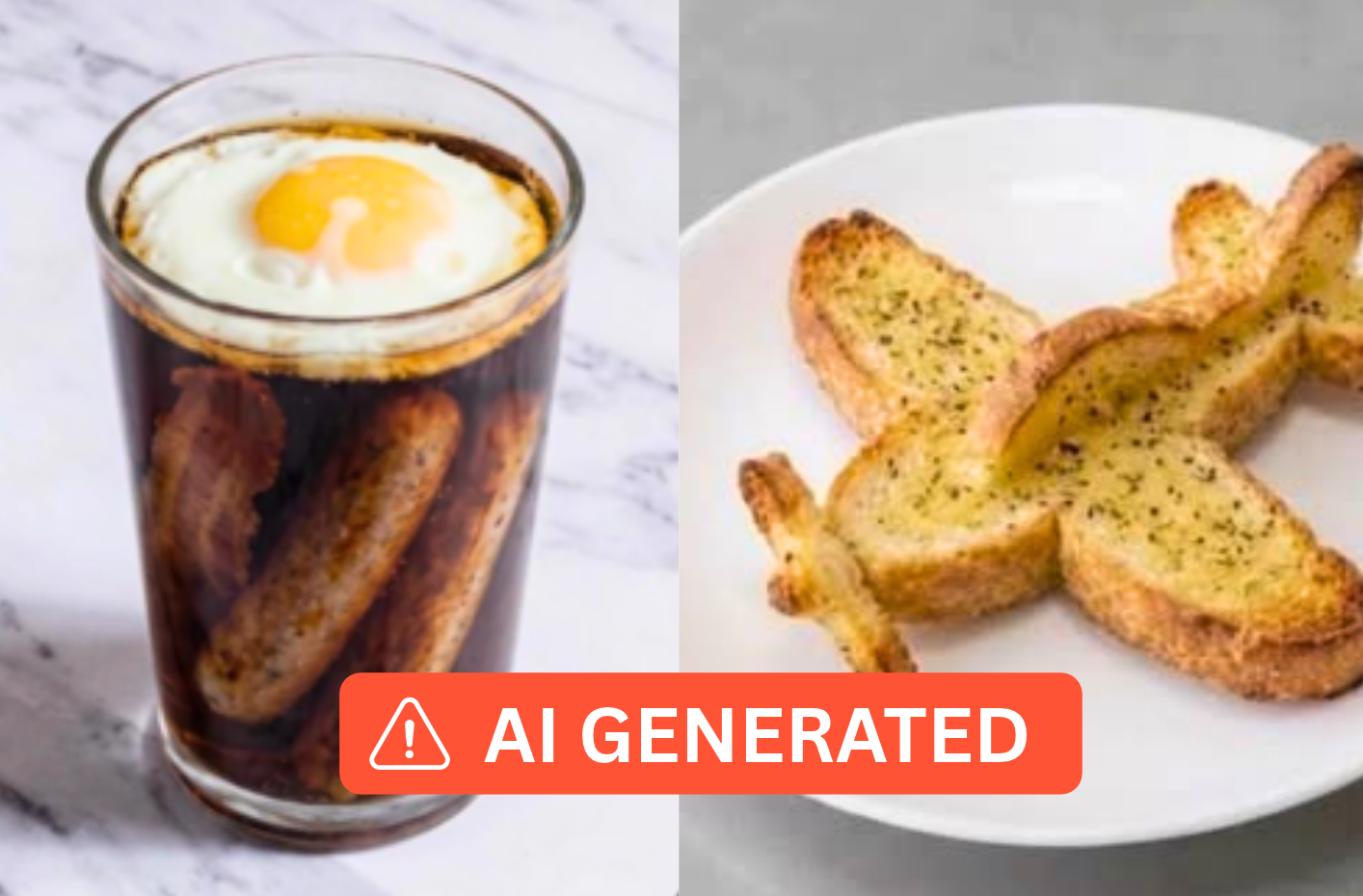
When Just Eat used AI to generate food images for restaurant menus, things didn’t quite go to plan. A bacon and egg soda became breakfast floating in a glass of cola, a chip muffin turned into a cake filled with chips, and garlic bread somehow became an aeroplane.

The results were amusing, but they highlighted a genuine problem with AI: it doesn’t always understand what you’re asking it to do.

For independent restaurants, cafés, pubs and takeaways, AI can be a genuinely useful tool. From tackling paperwork to planning promotions, it can save time and take some of the pressure off busy operators.

But there’s a big difference between asking AI to draft a cleaning checklist and letting it decide what your customers’ dinner looks like.


When AI food photography goes wrong

In October 2026, Just Eat paused a trial of AI-generated menu images after some rather unusual creations started circulating online.

The idea behind the trial was reasonable enough. Professional food photography can be expensive, particularly for smaller businesses with extensive menus. Using AI to create images from dish descriptions offered a potentially quicker, cheaper alternative.

Unfortunately, the technology didn’t always understand the context behind the dishes it was being asked to produce.

Just Eat apologised, began removing inaccurate images and paused the rollout while it worked on improving the technology.

The examples might be funny, but the underlying issue is more serious.

Customers expect the food they receive to resemble the food they’ve ordered. An image showing incorrect ingredients, unrealistic portion sizes or completely different dishes can create disappointment before the meal has even arrived.

It’s also a concern that delivery platforms are taking seriously. Deliveroo’s updated partner policies, effective from 9 October 2026, prohibit AI-generated food images and substantial AI alterations, although minor enhancements to genuine photographs are permitted.

The lesson isn’t that hospitality businesses should avoid AI altogether. It’s that some tasks are much better suited to automation than others.


Where AI can actually help your hospitality business

Running a hospitality business involves far more than preparing food and serving customers. There’s staff management, stock control, supplier communications, marketing, paperwork and a seemingly endless list of small jobs that need attention.

This is where AI can be particularly useful.

You don’t need a complicated system or a large budget to get started. Even a basic AI assistant can help with everyday tasks, especially when you’re using it to organise information or produce a first draft.

Taking the pressure off admin

Need to put together a staff cleaning rota, write an email to a supplier or create a checklist for opening and closing your venue?

AI can help you get the first version written in seconds.

For example, you could ask:

“Create a weekly cleaning checklist for a small café with five employees. Include daily and weekly tasks, with space for staff to sign off completed jobs.”

You can then adjust the result to match your business, equipment and actual cleaning requirements.

It won’t eliminate the need to manage these tasks, but it can save you staring at a blank document when you’ve already got enough to do.

Helping with marketing and promotions

Coming up with new social media content every week isn’t always easy, particularly when marketing is something you squeeze in between everything else.

AI can help brainstorm seasonal promotions, suggest social media topics, draft newsletters or turn a few rough notes into a more polished announcement.

You might ask it to suggest five ways to encourage repeat orders without offering large discounts, or help write a Facebook post promoting your new lunch menu.

The important thing is to make the content your own. A little personality goes a long way, especially for independent businesses where customers value the people behind the brand.

Making sense of business information

If you’ve got sales reports, spreadsheets or stock figures that you’re struggling to interpret, AI can help explain what the numbers might be telling you.

For example, it could help you identify which days have the strongest sales, compare performance between weeks or suggest questions worth investigating when costs increase.

Just make sure you’re working with accurate figures and using a tool approved for the information you’re sharing. AI can help interpret data, but it can also make mistakes in calculations or draw conclusions that the numbers don’t support.

Supporting staff training

Creating training materials from scratch takes time.

AI can help turn your existing procedures into simple onboarding guides, training checklists or quick-reference documents for new starters.

Whether you’re explaining how to open the venue, handle a customer complaint or complete a stocktake, having the information written down makes it easier to deliver consistent training.

You still need to check that everything reflects how your business actually operates, particularly where safety procedures are involved.


Where AI can go wrong

The Just Eat images are a particularly visible example of AI getting things wrong, but there are other risks that aren’t quite so obvious.

And some could have much bigger consequences than an unusual-looking burger.

1. Giving customers inaccurate information

AI can produce convincing answers that are completely incorrect.

That becomes a problem when you’re using it to write menu descriptions, respond to customer questions or explain ingredients.

For example, asking AI to generate allergen information based on the name of a dish is extremely risky. It doesn’t know exactly which ingredients your kitchen uses, how dishes are prepared or where cross-contamination could occur.

Allergen information must be based on verified recipes, ingredients and food preparation procedures, not an AI-generated guess. The Food Standards Agency’s allergen guidance explains businesses’ responsibilities for providing accurate information and managing allergens safely.

The same principle applies to prices, opening hours, special offers and availability. If you’re putting information in front of customers, someone needs to check that it’s correct.

2. Creating unrealistic expectations

Food photography is there to help customers decide what to order.

AI might create a beautiful-looking pizza, but what happens if it adds toppings you don’t offer, doubles the portion size or makes the finished dish look completely different?

Even if the result looks realistic, it could still be misleading.

A genuine photograph taken on a smartphone in good natural light is often a better option than an impressive AI-generated image of food your kitchen has never actually made.

Before uploading any food images, check the rules of the platforms you’re using and make sure the photographs accurately represent your dishes.

3. Sharing information you shouldn’t

It’s easy to forget that entering information into an AI tool can involve sharing it with an external service.

Customer names, contact details, employee information, financial records and supplier agreements shouldn’t be copied into AI platforms without understanding how that information will be handled.

The National Cyber Security Centre has warned about the risks of using unapproved AI tools, including the potential exposure of sensitive business and customer information.

For everyday tasks, use fictional examples or remove identifying details wherever possible.

If you’re using AI regularly within your business, establish some simple rules about which tools staff can use and what information they’re allowed to share.

4. Losing your business’s personality

One of the biggest strengths of an independent hospitality business is its character.

Your regulars know your team, your menu reflects your style and your social media might have a particular sense of humour.

If every customer message, promotion and social media post is generated by AI without any editing, that personality can quickly disappear.

There’s nothing wrong with using AI to help write something. But the finished message should still sound like it came from your business.


Five simple rules for using AI responsibly

You don’t need a complicated AI policy to start using these tools sensibly. A few straightforward rules can help you get the benefits without creating unnecessary risks.

  1. Start behind the scenes

Use AI for internal planning, admin, brainstorming and organising information. These are often lower-risk ways to save time while you learn what the technology does well.

  1. Check everything important

Treat AI-generated content as a first draft, not a finished answer. Double-check facts, figures, ingredients, prices and anything that could affect your customers or staff.

  1. Protect sensitive information

Avoid uploading personal, confidential or commercially sensitive information into tools unless you’re confident they are appropriate and secure for that purpose.

  1. Keep your food photography authentic

Show customers what they’ll actually receive. Use genuine images of your dishes, make sure descriptions are accurate and avoid AI alterations that change the appearance of the food itself.

  1. Keep a human in control

Whether it’s a customer-facing promotion, a staff training guide or a business report, someone should take responsibility for reviewing the final output.

AI can make suggestions and handle repetitive work, but it shouldn’t be making unchecked decisions on behalf of your business.


AI should save you time, not cost you trust

The Just Eat controversy is a good reminder that even well-intentioned technology can produce unexpected results.

The original goal was to help smaller businesses create menu imagery without the expense of professional photography. That’s a genuine challenge worth solving. But when the technology started producing dishes that didn’t exist, the potential time saving was overshadowed by questions about accuracy and customer trust.

For independent hospitality businesses, the best approach is to be practical.

Use AI where it makes everyday work easier. Let it help with paperwork, suggest promotional ideas, organise your processes or explain complicated information.

But when it comes to the food you serve, the promises you make and the relationships you build with customers, accuracy and authenticity should always come first.

After all, the best use of AI might not be something your customers ever notice. It could simply be the hour you save on paperwork that gives you more time to spend looking after them.

Spend less time on admin and more time running your business

From managing menus and orders to keeping track of sales and reporting, YUMA EPOS helps hospitality businesses stay organised and keep everyday operations running smoothly.
Explore YUMA EPOS


How to get more customers ordering directly from your takeaway

You’ve built your takeaway website, uploaded your menu and switched online ordering on. There’s just one problem: when your customers want to order, they’re still opening Deliveroo, Uber Eats or Just Eat.

That’s not particularly surprising.

Delivery apps are convenient. Customers already have them installed, their payment details may be saved and ordering through them is a familiar habit. Simply giving customers the option to order directly doesn’t mean they’ll automatically start using it.

Getting more direct orders means making customers aware that they can order from you directly, giving them a reason to do it and making the experience convenient enough that they’ll want to do it again.

Here are 10 practical ways to get more customers ordering directly from your takeaway.


Why don’t customers automatically order directly?

Think about the process from your customer’s perspective.

It’s Friday evening and they’ve decided they want a takeaway. They already have a delivery app on their phone, so they open it, find your business and place an order.

They might never think to search for your website.

Even customers who have ordered from you several times may not know you have your own online ordering system.

There are a few common barriers:

  • They don’t know direct ordering is available
  • They’re used to ordering through a particular delivery app
  • Their account and payment details are already saved
  • They originally discovered your takeaway through a marketplace
  • They don’t see a reason to change how they order
  • Finding your direct ordering page feels like more effort

You’re therefore trying to change an established customer behaviour.

To do that, focus on four things: visibility, convenience, incentive and repetition.


1. Put your direct ordering link everywhere customers can find you

Start by making sure customers can actually find your direct ordering system.

Your Order Online button should be one of the most prominent calls to action on your website, particularly on mobile.

But don’t stop with your website.

Look at every digital place where customers interact with your business and ask whether there’s an obvious route to ordering.

That could include your:

  • Google Business Profile
  • Instagram bio
  • Facebook page
  • TikTok profile
  • Email marketing
  • Email signatures
  • Link-in-bio page
  • Other local business listings

Your Google Business Profile is particularly important. Google allows food businesses to add ordering links to their profile and choose a preferred provider for pickup or delivery. That can give customers finding you through Google Search or Maps a route to your direct ordering system without needing to find your website first.

The fewer steps between someone deciding they want your food and reaching your menu, the better.

Don’t send someone to a generic homepage if you can send them directly to the page where they can start an order.


2. Promote direct ordering inside your delivery orders

One of your best opportunities to generate future direct orders comes from the orders you’re already receiving.

Think about someone receiving an order from your takeaway through Deliveroo, Uber Eats or Just Eat. They already know your business, they’ve chosen your food, and they’ve demonstrated that they order takeaway.

That makes them a highly relevant audience for promoting your direct ordering option.

Consider including something with fulfilled orders such as a:

  • Flyer
  • Thank-you card
  • Menu
  • Sticker
  • Business card
  • QR code

The message doesn’t need to be complicated:

Enjoyed your order? Order directly from us next time at [your website].

You can make that proposition stronger by giving them a reason to try it, such as a direct-order offer or loyalty reward.

Before including promotional materials with marketplace orders, check the current terms of the delivery platforms you use to ensure your approach complies with your agreements.


3. Give customers a reason to order directly

Ordering directly may be better for your business, but that’s unlikely to be enough to change your customer’s behaviour.

Ask a more important question:

What’s in it for them?

Price and value can play a part. YouGov research published in 2026 found that high service fees were the most commonly cited frustration with food delivery services, mentioned by 40% of British adults.

That doesn’t mean your direct channel simply needs to be cheaper. But offering customers better value through a direct-only bundle, free extra, loyalty reward or other incentive can give them another reason to change their ordering habit.

There are plenty of ways to make direct ordering more attractive without permanently discounting your entire menu.

You could offer:

  • A direct-order discount
  • A free side above a certain spend
  • Exclusive meal bundles
  • Direct-only menu items
  • Free extras
  • Loyalty points or rewards
  • Limited-time promotions

Think carefully about the behaviour you’re rewarding. If customers can get the same food, at the same price, through the delivery app they’re already familiar with, there may be little reason for them to change. That doesn’t mean you need to be dramatically cheaper – sometimes a small extra benefit is enough to make ordering directly feel worthwhile.

Try to add value rather than relying entirely on blanket discounts that eat into your margin.


4. Use QR codes to make direct ordering easy

Telling customers to order directly is one thing. Making them type your website address into their phone is another.

A QR code removes several steps.

Customers scan it with their phone and arrive directly at your ordering page.

QR codes can be added to:

  • Delivery bags
  • Flyers
  • Menus
  • Receipts
  • Counter displays
  • Collection areas
  • Shop windows
  • Table displays
  • Business cards

Wherever possible, send the customer straight to your online ordering page. Don’t make them scan a code, arrive on your homepage, find the menu, click another link and then start their order.

The ideal journey is:

Scan → choose food → order.


5. Turn collection customers into online customers

Delivery customers aren’t your only opportunity.

Someone collecting an order from your takeaway is already an existing customer. They know where you are, they know your food and they’ve deliberately chosen your business.

The collection experience is the perfect time to to tell them about direct online ordering.

A simple counter sign could say:

Ordering again? Skip the wait and order directly online next time.

You can also add your ordering URL or QR code to:

  • Collection bags
  • Receipts
  • Printed menus
  • Counter displays

Staff can mention it too, particularly if someone has ordered over the phone.

It doesn’t need to become a sales pitch. A simple “You can order through our website next time if that’s easier” is enough to make the customer aware that the option exists.


6. Make direct ordering genuinely convenient

Marketing can persuade someone to try your direct ordering system, but the experience determines whether they’ll use it again.

Customers have become accustomed to relatively smooth ordering experiences through major delivery apps. If your direct ordering website is confusing, slow or difficult to use on a phone, an introductory discount isn’t going to fix the underlying problem.

Test the entire experience yourself.

Look at:

  • Mobile usability
  • Page speed
  • Menu navigation
  • Product images and descriptions
  • Modifier selection
  • Collection and delivery options
  • Payment methods
  • Number of checkout steps
  • Order confirmation

Better still, ask someone unfamiliar with the system to place a test order while you watch – where do they hesitate? What can’t they find? Which steps aren’t obvious?

The question to keep asking is:

Is ordering directly from us easy enough that a customer would choose to do it again?

If you’re still choosing your technology, our guide to what to look for in an online ordering system covers the features worth considering.


7. Give customers a reason to come back

Getting someone to place their first direct order is useful, but getting them to place their fifth, tenth and twentieth is much more valuable.

This is where loyalty can play an important role. Instead of treating every order as a separate transaction, consider how you can reward customers for repeatedly choosing your direct channel.

That might include:

  • Points for direct orders
  • Rewards after a certain number of purchases
  • Spend-based rewards
  • Free products
  • Birthday rewards
  • Exclusive offers for returning customers

A one-off discount might convince someone to try ordering directly – a good loyalty proposition gives them a reason to keep doing it.

This is also why you should think beyond simply comparing the cost of a direct order with the cost of a marketplace order. The bigger opportunity is building a direct relationship with customers who regularly order from you.


8. Use your customer data to encourage repeat orders

One of the advantages of direct ordering is the opportunity to build your own customer relationship.

With the appropriate marketing permissions, that can give you ways to communicate with customers after their first order.

For example, you could use email or SMS to promote:

  • New menu items
  • Weekend offers
  • Seasonal specials
  • New meal bundles
  • Loyalty rewards
  • Limited-time discounts
  • Re-engagement offers

The aim shouldn’t be to message customers constantly. Instead, think about when your marketing is genuinely useful.

A message about a Friday night offer at 5pm is very different from sending generic promotional messages several times a week.

If you’re collecting customer information for marketing, make sure you’re following the relevant privacy and electronic marketing rules. The ICO’s guidance on electronic mail marketing explains the rules around marketing by email and SMS, including consent and when the existing-customer “soft opt-in” may apply.

Importantly, you shouldn’t assume that someone providing their email address or phone number to place an order automatically means you can use those details for marketing.


9. Use social media to drive direct orders

If you’re already spending time building an audience on Instagram, Facebook or TikTok, give that audience an easy route to becoming customers.

But don’t make every post:

ORDER DIRECT NOW!

Build direct ordering into content that already gives someone a reason to want your food.

For example:

Launching a new burger?
Show it, describe it and link directly to where customers can order it.

Running a weekend special?
Make the offer available through your direct ordering channel.

Friday afternoon?
Remind followers that dinner can be ordered in a few taps.

Big football match tonight?
Create a relevant meal bundle and direct customers to the ordering page.

Your content creates the demand while your direct ordering link gives the customer somewhere to act on it.

Make sure that link is easy to find when they do.


10. Make direct ordering part of your wider marketing

Direct ordering shouldn’t sit on its own as a separate project.

Look at the marketing you’re already doing.

That might include:

  • Leaflet drops
  • Paid social advertising
  • Organic social media
  • Google advertising
  • Email
  • SMS
  • Local sponsorships
  • Influencer campaigns
  • Printed menus
  • In-store promotions

For each campaign, ask:

Where are we sending the customer?

If someone sees an advert for a new meal deal, don’t make them search for your business afterwards.

Give them a clear route to order.

The same applies offline.

If you’re printing 5,000 leaflets, including a QR code that takes customers directly to your menu can turn that leaflet from simple awareness into an ordering route.

The direct ordering system should become the destination for your marketing rather than something customers are expected to discover by themselves.


Should you stop using Deliveroo, Uber Eats and Just Eat?

Not necessarily.

Direct ordering doesn’t need to mean abandoning the delivery apps. Marketplaces such as Deliveroo, Uber Eats and Just Eat can put your takeaway in front of customers who might not otherwise discover it. That reach is extremely valuable.

Direct ordering solves a different problem.

Once a customer already knows your business, you have an opportunity to build a more direct relationship with them and give them another way to order. A useful way to think about it is:

Delivery marketplaces can help customers discover you. Direct ordering can help you build the relationship afterwards.

The two can operate alongside each other.

If you’re using several delivery platforms, you can also reduce some of the operational complexity by bringing them together. Read our guide to managing Deliveroo, Uber Eats and Just Eat in one place for more on how delivery app integrations work.

We’ve also broken down the wider commercial differences in our guide to delivery app fees vs direct ordering.


How do you know if your direct ordering strategy is working?

Don’t judge your direct ordering system simply by whether orders are coming through it. Track whether you’re actually shifting customer behaviour over time. Some useful measures include:

Direct orders per month

Start with the simplest number. How many direct orders did you receive this month compared with last month?

If you’re actively promoting direct ordering, you should be able to see whether that activity is translating into orders.

Percentage of online orders placed directly

Raw order numbers don’t tell the whole story. If your takeaway is growing, direct orders might increase while their share of your total online orders stays the same.

Tracking the percentage of orders coming directly gives you a clearer picture of whether customers are actually changing how they order.

Repeat direct customers

How many customers place another direct order? If lots of customers use an introductory offer once but immediately return to a marketplace afterwards, look at the experience and incentives you’re providing after that first purchase.

Average order value

Compare how much customers typically spend through different ordering channels.

This can help you understand whether bundles, minimum-spend offers, modifiers and other promotions are changing customer behaviour.

Offer and QR code redemptions

If you’re using promotional codes or trackable QR codes, use them to understand where direct customers are coming from.

For example, you could use different campaigns for:

  • Delivery bag inserts
  • Collection counter
  • Printed leaflets
  • Instagram
  • Email
  • SMS

That allows you to identify which activity is actually generating orders rather than relying on guesswork.

You don’t need to change everything at once.

Test one approach, measure the result and improve it.


Get more direct orders with YUMA

YUMA Online Ordering gives takeaways their own way to take orders directly from customers.

Your direct ordering channel can sit alongside Deliveroo, Uber Eats and Just Eat rather than forcing you to choose between them.

YUMA can help you:

  • Take orders directly online
  • Manage your menu centrally
  • Build direct-only offers
  • Encourage repeat ordering
  • Use QR codes to promote your direct channel
  • Build your own customer relationship
  • Manage third-party delivery orders alongside your direct orders

For businesses that still want to offer delivery without relying entirely on marketplace couriers, Uber Direct can also provide access to delivery drivers for eligible direct orders.


Turn more customers into direct customers

Launching direct online ordering is only the beginning. If customers don’t know it exists, can’t find it or have no reason to change how they currently order, they’ll probably continue using the channels they’re already familiar with.

Make direct ordering visible. Make it convenient. Give customers a reason to try it. Then give them a reason to come back.

Over time, direct ordering can become part of how you market your takeaway, communicate with your customers and build repeat business – while delivery marketplaces continue to play their own role in bringing new customers through the door.

Want to start taking more orders directly?

Explore YUMA Online Ordering and see how you can start building your own direct ordering channel.

How to manage Deliveroo, Uber Eats & Just Eat in one place

Being on more than one delivery app can help your restaurant reach more customers. But it can also create more work for the people actually running your service.

Deliveroo, Uber Eats and Just Eat each have their own systems for receiving and managing orders. If you’re using two or three platforms at the same time, that can leave your team switching between different tablets, notifications and menus throughout a busy shift, but it doesn’t have to work that way.

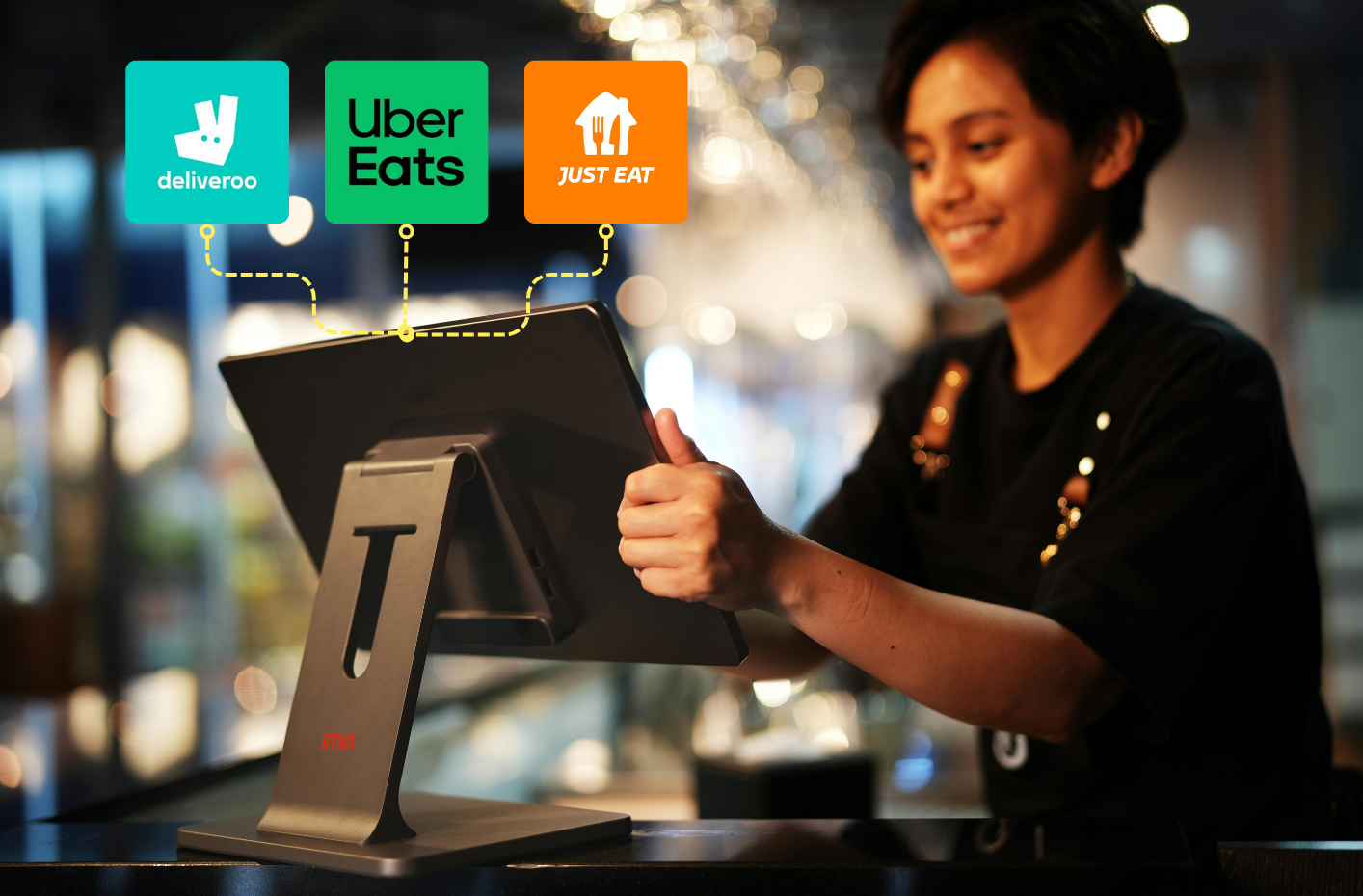
Delivery app management software can bring orders from multiple platforms into one place, giving your team a simpler way to manage delivery without constantly jumping between separate systems.

Here’s how it works, what it can help with and what to look for if you’re considering bringing your delivery apps together.


Why managing multiple delivery apps gets complicated

Adding another delivery platform can make commercial sense. It gives customers another way to find and order from you without requiring them to change the app they already use.

Operationally, however, every new platform can add another system for your team to manage.

Deliveroo recommends that businesses using its Live Orders system keep the interface open on a dedicated tablet or laptop, with notifications enabled and the device volume turned up so incoming orders aren’t missed. Uber Eats has its own Orders system for managing orders, deliveries and menus, while Just Eat sends incoming orders to its Orderpad for acceptance.

If you’re using several platforms, your team can therefore find themselves having to:

  • Monitor several devices or interfaces
  • Listen for different order notifications
  • Keep track of orders coming from different places
  • Update menus and availability across multiple platforms
  • Re-enter orders into another EPOS or kitchen system
  • Learn how each platform works

None of these jobs is particularly complicated on its own. The problem comes when they’re all happening at once.

During a quiet Tuesday afternoon, switching between different delivery apps might not cause much trouble. During a Friday evening rush, when you’re also serving customers in person and preparing existing orders, unnecessary steps quickly become more noticeable.


Can you manage Deliveroo, Uber Eats and Just Eat in one place?

Yes. This is where delivery app management software, sometimes called a delivery aggregator or middleware, comes in. Instead of staff monitoring each delivery platform separately, the software connects supported platforms and brings their orders into one central system.

Your customers don’t need to change how they order. Someone can still find you on Deliveroo and place their order through Deliveroo, another customer can order through Uber Eats, while someone else uses Just Eat.

The difference is what happens at your end. Rather than those orders arriving across several separate systems, they can be brought together into one place for your team to manage.


Delivery app aggregator vs EPOS integration

It’s worth understanding the difference between bringing your delivery apps together and integrating them with your EPOS.

A delivery app aggregator brings orders from multiple delivery platforms into one central interface.

An EPOS integration can take this further by connecting those orders with your wider till or kitchen setup.

Deliveroo describes middleware as a digital bridge between an ordering channel and a restaurant’s POS. Depending on the integration, this can include automatically synchronising orders, menus and stock information. Exactly what is automated depends on the systems you’re using.

For example, if you use delivery management software alongside an EPOS system that isn’t integrated with it, your team may still need to enter the order into the EPOS or kitchen system manually.

So when comparing different providers, don’t just ask whether they “integrate your delivery apps”, find out exactly what that integration includes.


What can you manage from one system?

The exact features depend on the provider you choose, but bringing your delivery platforms together can simplify several everyday tasks.

Manage your delivery orders in one place

The most obvious benefit is having one place to see incoming delivery orders. Instead of your team repeatedly checking separate systems for Deliveroo, Uber Eats and Just Eat, supported orders can appear within a central interface, which can create a much simpler process for staff during service.

They have fewer places to monitor and a clearer view of the delivery orders that need their attention.

Manage your menus centrally

Menus are another area where using several delivery platforms can create unnecessary admin.

Imagine you’ve introduced a new burger. If your menus are managed separately, someone may need to add its name, description, price, modifiers and availability to each individual platform. The same problem happens every time something changes. Prices go up, items are removed, new dishes launch, options and modifiers change, etc.

Central menu management allows you to make supported changes from one place rather than repeating the same job across several different systems.

Control item availability

Running out of something halfway through service is frustrating enough without having to remember everywhere that item appears.

Deliveroo, for example, provides its own stock controls for marking menu items as sold out or unavailable, with other platforms have their own menu-management processes.

With an integration that supports centralised menu and stock management, these changes can instead be controlled from the connected system.

That can be particularly useful during busy periods, when the person responsible for delivery orders probably has more important things to do than work through several different platforms.

Print delivery orders

Depending on your setup, incoming delivery orders can also be sent to a connected printer.

That gives the team preparing the order a physical ticket and can help bring delivery orders into your existing kitchen workflow.

The important thing is creating a consistent process – whether an order came through Deliveroo, Uber Eats or Just Eat should make as little difference as possible to the people responsible for preparing it.


What are the benefits of bringing your delivery apps together?

The goal isn’t simply to have fewer tablets on the counter. Instead, it is to remove unnecessary complexity from the way your team handles delivery.

Fewer systems for staff to monitor

Instead of repeatedly moving between different delivery interfaces, staff have one primary place to manage supported orders.

This is particularly valuable when your team is also dealing with customers at the counter, phone calls, collections and dine-in orders.

Lower risk of overlooking an order

When orders are spread across several devices, staff need to keep track of what’s happening on all of them.

Bringing orders together creates a clearer central workflow and reduces the number of separate places your team needs to watch.

Less repetitive admin

Making the same menu change multiple times isn’t a good use of anyone’s time.

Central management can reduce repetitive tasks and give managers one place to make supported changes.

Simpler staff training

Every additional system gives new employees something else to learn.

A central delivery workflow can make training simpler by reducing the amount of switching staff need to do during service.

A more consistent delivery workflow

Ultimately, it shouldn’t matter to your kitchen whether a customer prefers Deliveroo, Uber Eats or Just Eat.

The customer chooses their preferred ordering channel. Your team gets a consistent process for handling the resulting order.


Do you need to change your EPOS system?

Not necessarily.

Delivery app management and EPOS are related, but they’re not the same thing.

A delivery app management system can bring your marketplace orders together without necessarily requiring you to replace your existing EPOS.

There is an important distinction, though. If your delivery management software isn’t integrated with your existing EPOS, your team may still need to manually enter orders into the till or kitchen system. If you’re already reviewing your wider technology setup, it may therefore be worth looking at how your restaurant EPOS system or takeaway EPOS system handles delivery integrations.

With YUMA EPOS, orders from Uber Eats, Deliveroo and Just Eat can be processed through the EPOS alongside in-house and direct orders, creating a more connected workflow.

The important thing is to understand which parts of your process are being connected before you sign up.


What should you look for in a delivery app management system?

Not every restaurant needs exactly the same setup, so start with how your business currently handles delivery.

Some useful questions to ask potential providers include:

  • Which delivery platforms can I connect?
  • Can I manage orders from one interface?
  • Can I update menus centrally?
  • Can I control item availability across my channels?
  • Can orders be sent to a printer?
  • Do I need to change my current EPOS?
  • What happens if my EPOS isn’t integrated?
  • Do I need new hardware?
  • Can I continue using my existing delivery platform accounts?
  • How much does the system cost?
  • Is there a minimum contract?
  • Does the provider also support direct online ordering?

That last question is particularly important if you’re looking at your longer-term delivery strategy.

Managing marketplace orders more efficiently solves the operational challenge of being on several delivery apps, but it doesn’t change the fact that those orders are still being placed through third-party marketplaces.

Direct online ordering tackles a different problem by giving customers a way to order directly from your business.

If you’re deciding how these channels should work together, we’ve looked at what UK restaurants actually pay for delivery apps compared with direct ordering.

You can also read our guide to what to look for in an online ordering system if you’re reviewing your wider ordering setup.


Manage Deliveroo, Uber Eats and Just Eat with YUMA

YUMA’s delivery integrations are designed to make managing multiple delivery platforms simpler.

Rather than treating Deliveroo, Uber Eats and Just Eat as completely separate parts of your operation, YUMA can bring delivery orders into the same wider workflow used for your other orders.

For businesses using YUMA EPOS, orders from supported delivery platforms can be processed through the EPOS alongside in-house and direct orders.

That means your restaurant can bring together:

  • Deliveroo orders
  • Uber Eats orders
  • Just Eat orders
  • In-house orders
  • Collection orders
  • Direct online orders

For takeaways in particular, bringing these channels together can remove some of the manual work involved in managing a high volume of orders during peak periods. You can see more about how this works on our EPOS system for takeaways page.

Delivery integrations can also sit alongside YUMA Online Ordering, giving customers a way to order directly from your business as well as through the marketplaces they already use.

The two solve different problems.

Delivery app management makes third-party delivery platforms easier to manage.

Direct online ordering gives customers another way to order from you directly.

You don’t necessarily have to choose between them.

Delivery marketplaces can continue to provide reach and customer discovery, while your own ordering channel gives existing customers another route to order from you.


Bring your delivery orders together

Using Deliveroo, Uber Eats and Just Eat doesn’t have to mean managing three completely separate workflows.

Bringing your delivery platforms together can give your team fewer systems to monitor, reduce repetitive admin and create a more consistent process for handling delivery orders during busy service.

And if you’re also taking orders in-house or through your own website, connecting those channels with your wider EPOS setup can simplify things further.

Using more than one delivery platform?

See how YUMA can bring your delivery, in-house and direct orders into a more connected workflow.

Explore YUMA’s EPOS for takeaways or get in touch with YUMA.

Delivery app fees vs direct ordering: What UK restaurants actually pay

If a customer spends £25 through a delivery app, how much of that actually reaches you? The honest answer depends heavily on which platform, which delivery model, and which agreement – but it’s an answerable question, and most restaurants have never actually worked it out.

Delivery apps aren’t bad value. They give you customer acquisition, visibility and delivery infrastructure your own website doesn’t automatically have. The real question is simpler: Does every repeat customer need to keep ordering through a marketplace, or is some of that traffic worth bringing direct?


How much do food delivery apps charge restaurants in the UK?

Platform Self-delivery / pickup Platform-delivered Source
Uber Eats 13% + VAT 30% + VAT Uber Eats UK merchant pricing
Just Eat 14% + VAT 30% + VAT Just Eat partner terms
Deliveroo Contract dependent Contract dependent Check your Deliveroo agreement

Unlike Uber Eats, Deliveroo doesn’t publicly list a standard UK restaurant commission rate. Partner pricing can depend on the individual agreement, so check your current contract rather than relying on a generic percentage quoted online.

Rates, agreements and additional charges (admin fees, promotional costs, payment processing) can all vary by location, volume and exclusivity terms. 


What does a £25 delivery order actually cost?

Take a £25 customer order on a platform-delivered model at roughly 30% commission plus VAT:

Item Amount
Customer order value £25.00
Commission (30%) £7.50
VAT on commission £1.50
Illustrative platform deduction £9.00
Remaining before food, labour and other costs £16.00

Scale that up:

Orders Customer spend Illustrative platform deductions
1 £25 £9
100 £2,500 £900


Why do restaurants still use delivery apps?

It’s not just inertia. Marketplaces provide:

  • Access to a large existing customer base you don’t have to build yourself
  • Customer discovery – being found by people who’ve never heard of you
  • Marketing reach beyond what most independents could achieve alone
  • Built-in delivery infrastructure, with no fleet or drivers to manage
  • Potential incremental orders that wouldn’t otherwise exist

That cost may make commercial sense when the platform is acquiring a customer you wouldn’t otherwise have reached. The calculation changes when you’re paying the same percentage on repeat orders from existing customers.


What happens when customers keep ordering through delivery apps?

If a customer discovers you through an aggregator for the first time, the platform has clearly delivered real acquisition value – that’s the fee doing its job. But if that same customer goes on to place another 10 orders through the marketplace, you continue paying the applicable marketplace fee each time they order through that platform.

Using the illustrative £25 order at 30% plus VAT:

Orders Customer spend Illustrative platform deductions
10 £250 £90
100 £2,500 £900
1,000 £25,000 £9,000


How does direct online ordering work?

The basic journey is simple: A customer visits your own website, browses the menu, pays, and the order comes straight to you.

Direct ordering doesn’t make orders free. It changes the cost structure and can reduce your reliance on marketplace commission specifically. Depending on the provider, you may instead pay subscription, transaction, payment processing or delivery fees.


Delivery apps vs direct ordering: How do the costs compare?

Take 100 monthly orders at £25 average order value, worth £2,500 in total customer spend:

Marketplace example (30% + VAT) Direct ordering
Monthly orders 100 100
Average order value £25 £25
Customer order value £2,500 £2,500
Marketplace commission £750 £0
VAT on commission £150 £0
Online ordering cost Included/varies Provider-dependent
Payment processing Included/varies Provider-dependent
Delivery Included/varies Separate if required
Customer relationship Platform-mediated Direct

The direct column isn’t “free” – it just moves the cost from one scaling percentage to a different, generally more fixed and more visible structure. The real comparison is your total cost of accepting, processing and fulfilling the order under each model, not “0% versus 30%.”


What about delivery when customers order directly?

One of the obvious questions around direct ordering is delivery: What if you don’t employ your own drivers?

Taking an order and delivering it don’t have to be handled by the same provider. You can accept an order through your own website, take payment directly, send it straight into your EPOS, and fulfil it either with your own drivers or through an integrated third-party delivery service. 

Uber itself now markets Uber Direct on exactly this premise, where customers order through the restaurant’s own website or app while Uber’s network handles fulfilment. “Direct” is about who owns the customer relationship and the ordering channel, not necessarily about who’s driving the food over.


Do restaurants need to choose between delivery apps and direct ordering?

Restaurants absolutely don’t need to choose between the two.

Marketplaces are valuable for reach and acquiring new customers. Direct ordering is valuable for repeat customers and reducing unnecessary reliance on marketplace commission. Most restaurants don’t need to pick a side – they need a deliberate channel mix, rather than defaulting entirely to whichever channel they set up first.


How can restaurants manage direct and delivery app orders together?

Running multiple channels at once commonly means multiple tablets, orders arriving through different systems, manual re-keying, separate menus to keep in sync, and more chances for mistakes. 

All of this adds admin for your staff exactly when they’re busiest.

YUMA brings those different ordering routes into your wider EPOS workflow — delivery integrations sit alongside direct ordering rather than as a separate, disconnected system to manage on top of everything else.


When does direct ordering make financial sense?

Three factors decide how much difference this makes for your restaurant:

Average order value. The higher the value of an order, the greater the pound-cost of a percentage-based commission. A £40 order at 30% costs meaningfully more in absolute terms than a £15 one.

Number of direct orders. The more repeat orders you can shift to a direct channel, the more significant the cost difference becomes over a month or a year.

Customer acquisition cost. Direct customers don’t appear for free. You may need to invest in SEO, your Google Business Profile, social media, email, SMS, loyalty schemes, in-store promotion, QR codes, or paid advertising to build awareness of your direct channel. Direct ordering becomes particularly compelling once you already have an established customer base you can actively encourage to order directly, rather than starting from nothing.


How can you calculate what delivery apps are costing your restaurant?

Monthly aggregator order value multiplied by the commission rate gives you estimated commission:

Item Amount
Monthly order value £10,000
Commission (30%) £3,000
VAT on commission (20%) £600
Illustrative total £3,600

Compare that figure against the complete cost of generating, processing and fulfilling the equivalent orders directly (online ordering costs, payment processing, delivery, and whatever it costs to make customers aware the direct option exists) rather than assuming the direct total is automatically lower.


Delivery apps or direct ordering: Which approach works for your restaurant?

Delivery apps give you reach, discovery and delivery infrastructure that’s hard to replicate on your own, especially if you’re new or growing. Direct ordering gives you more control over your ordering channel and reduces your reliance on percentage-based marketplace commission, particularly for customers who already know you.

A combined approach lets restaurants use marketplaces where they add value while building a direct channel for customers who already know where they want to order from.


Take more orders directly without adding more admin

YUMA brings EPOS, online ordering and delivery integrations together, so direct website orders and supported third-party delivery orders can feed into the same wider operation. Build your own direct ordering channel without adding another disconnected system for your team to manage.

Explore YUMA online ordering or book a demo.


Frequently asked questions

How much commission does Uber Eats charge restaurants in the UK?

Uber Eats’ published UK merchant pricing is 30% plus VAT when Uber handles delivery, and 13% plus VAT for restaurant self-delivery or pickup orders. Additional charges, such as an activation fee, may also apply depending on your plan.

How much commission does Just Eat charge restaurants in the UK?

Just Eat’s partner terms set commission at 14% plus VAT when the restaurant delivers, rising to 30% plus VAT when Just Eat’s own delivery network handles the order. Rates can vary by agreement.

Does Deliveroo charge restaurants commission?

Yes, but Deliveroo doesn’t publish a standard UK commission rate the way Uber Eats does. Pricing depends on your individual partner agreement, so check your Deliveroo Partner Hub contract for your specific rate.

Is direct ordering cheaper than using delivery apps?

Not automatically. Direct ordering removes marketplace commission, but replaces it with other costs – subscription, transaction, payment processing or delivery fees, depending on the provider. Whether it’s cheaper depends on your order volume, average order value and how many customers you can move to a direct channel.

Online Ordering systems for restaurants: What should you look for?

Online ordering used to mean a page where customers could place an order. Restaurants now have several options: Their own website or app, marketplaces such as Deliveroo, Uber Eats and Just Eat, standalone platforms, or ordering built directly into their EPOS.

The important question isn’t which system has the longest feature list. It’s what happens after the customer presses “place order” — and how well that order fits into the rest of the restaurant’s operation.


What is a restaurant online ordering system?

An online ordering system lets customers browse a restaurant’s menu, place and usually pay for a collection or delivery order digitally. That covers several genuinely different setups:

  • Third-party marketplaces (Deliveroo, Uber Eats, Just Eat)
  • A restaurant’s own branded website
  • A dedicated mobile app
  • QR or table ordering
  • Ordering built directly into an EPOS platform

Restaurants often use more than one of these channels. The important question is how well they work together.


1. Does it connect directly to your EPOS?

This is one of the most important questions on this list, because there’s a real difference between an ordering platform simply existing alongside the EPOS and being genuinely integrated with it.

Ask directly:

  • Do online orders appear automatically on the till?
  • Do they go straight to the kitchen or KDS?
  • Are online and in-store sales reported together, or separately?
  • Does stock update from online sales the same way it does from till sales?
  • Does the restaurant need another tablet to manage this?
  • Does anyone ever have to manually re-key an order?

Picture 20 online orders arriving alongside a busy Friday-night service. If staff have to monitor another screen and manually re-enter those orders, the system isn’t fully integrated. Ask the provider to demonstrate exactly what happens from the moment an online order is placed.

What a connected hospitality tech stack actually looks like and how to compare EPOS software both cover this in more depth – worth reading before judging any provider’s answer on this point.


2. What does it actually cost you per order?

The headline monthly subscription is only part of the picture. A full cost comparison needs to account for:

  • Monthly platform fee
  • Setup fees
  • Payment processing
  • Per-order charges
  • Commission
  • Website or app costs
  • Delivery charges
  • Minimum order requirements
  • Contract length

The important distinction is between a fixed software cost and costs that scale with order value. A system that looks cheap on the monthly invoice can still cost more overall once commission or per-order fees are added up across a busy month.


3. How easy is it to manage your menu?

Menu management can create significant admin if your EPOS and online ordering system aren’t connected. Check whether:

  • You can change a price once and have it update everywhere
  • You can mark something unavailable immediately, across every channel
  • Different locations can have different menus or prices
  • Modifiers can be configured properly, not just bolted on
  • Allergen and product information is manageable in the same place
  • You need to update the EPOS and the online menu separately

Ideally, a menu change should only need to be made once. YUMA’s EPOS features already covers how menu changes should push across every site, device and ordering channel at once.

Allergen information deserves a specific mention here. Under Food Standards Agency guidance, food sold through distance selling (including online ordering) needs written allergen information available at two separate points: Before the order is placed, and again when it’s delivered. A menu system that can’t surface this cleanly online isn’t just a convenience gap, it’s a compliance one.


4. Can it handle collection and delivery properly?

“Delivery” as a checkbox on a features list tells you nothing about how it actually behaves under pressure. Look for genuine control over:

  • Collection time slots
  • Delivery zones
  • Delivery fees by area
  • Minimum order values
  • Estimated preparation times
  • Opening hours
  • Order throttling or capacity limits
  • Temporarily disabling ordering
  • Customer order updates
  • Pre-orders

Capacity controls are particularly important during busy periods. Check whether orders can be throttled, delayed or temporarily paused when the kitchen reaches capacity.


5. Can you build a direct customer relationship?

Direct ordering can give restaurants greater control over the customer relationship. Check whether:

  • You can identify repeat customers
  • Customers can create accounts
  • Ordering history feeds into loyalty
  • Customers can opt into marketing properly
  • You can run promotions to your own customer base
  • You can see how often customers actually return
  • The system supports offers and vouchers, not just one-off transactions

Not every restaurant needs an elaborate loyalty scheme on day one. What matters is that the ordering system doesn’t block one being built later – marketing tools that plug straight into the same customer data are worth having in place even before a formal programme exists.

Collecting an email address during an order doesn’t automatically give a restaurant permission to use it for marketing. See the ICO’s direct marketing guidance for the applicable requirements.


6. Is the customer experience actually good?

The operational side can work perfectly while a poor ordering experience still costs the restaurant sales. Look for:

  • Mobile-first ordering
  • Fast load times
  • A simple checkout
  • Guest checkout, not a forced account
  • Apple Pay, Google Pay or similarly convenient payment options
  • Clear, easy-to-use modifiers
  • Easy reordering
  • Clear collection and delivery information
  • Consistent branding with the rest of the restaurant

Test the ordering journey yourself on mobile before choosing a provider.


7. Can it grow with your restaurant?

Some requirements don’t matter today and become genuinely painful the moment a restaurant expands. Worth thinking ahead about:

  • Multiple locations
  • Central menu management
  • Site-specific pricing
  • Central reporting
  • Different delivery zones per site
  • Central customer and loyalty data
  • Staff permissions
  • Franchise or group structures

Even single-site operators should understand what would change if they opened another location, including pricing, menu management, reporting and customer data. How software requirements change moving from one site toward several is worth reading now, before it becomes urgent.


Questions to ask before choosing an online ordering system

A concise checklist worth taking into any supplier conversation:

Ask the provider Why it matters
Where does an online order go when a customer places it? Whether it’s genuinely integrated
Do staff ever need to re-enter an order? Operational efficiency
How are menu changes managed? Whether you’re duplicating admin
What will 500 online orders actually cost me? True cost
Who controls the customer data? Customer ownership
What happens when the kitchen reaches capacity? Operational control
Can I manage delivery areas and collection times? Fulfilment flexibility
Can it connect to loyalty and marketing? Repeat business
What changes if I open another location? Scalability
What support is available during service? Reliability


Do you need your own online ordering system if you’re already on Deliveroo, Uber Eats or Just Eat?

Essentially, yes. They serve different purposes. Marketplaces can help restaurants reach customers through established ordering and delivery platforms. Direct ordering gives the restaurant more control over its branding, customer journey and the cost of repeat orders.

Many restaurants therefore use both: Marketplaces for reach, and their own ordering channel for customers who already know the business.


The takeaway: look beyond the ordering page

When comparing online ordering systems, look at the whole journey:

Customer → order → payment → EPOS → kitchen → stock → reporting → repeat customer

The best setup minimises manual handoffs between those stages. Ask providers to demonstrate that complete journey rather than comparing feature lists alone.

Want to see how online ordering connects with your EPOS? Explore YUMA Online Ordering or book a demo.