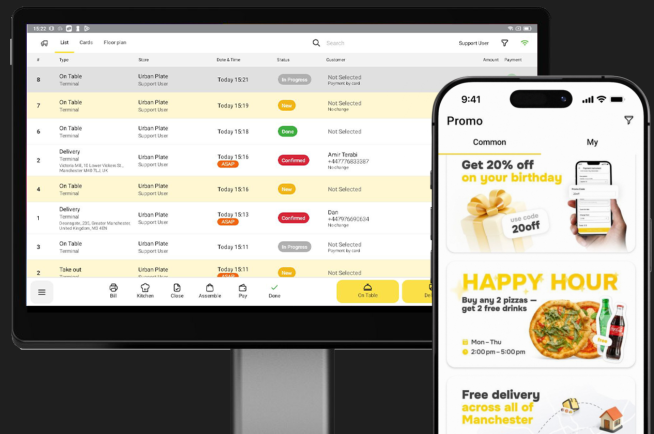
Online ordering used to mean a page where customers could place an order. Restaurants now have several options: Their own website or app, marketplaces such as Deliveroo, Uber Eats and Just Eat, standalone platforms, or ordering built directly into their EPOS.
The important question isn’t which system has the longest feature list. It’s what happens after the customer presses “place order” — and how well that order fits into the rest of the restaurant’s operation.
What is a restaurant online ordering system?
An online ordering system lets customers browse a restaurant’s menu, place and usually pay for a collection or delivery order digitally. That covers several genuinely different setups:
- Third-party marketplaces (Deliveroo, Uber Eats, Just Eat)
- A restaurant’s own branded website
- A dedicated mobile app
- QR or table ordering
- Ordering built directly into an EPOS platform
Restaurants often use more than one of these channels. The important question is how well they work together.
1. Does it connect directly to your EPOS?
This is one of the most important questions on this list, because there’s a real difference between an ordering platform simply existing alongside the EPOS and being genuinely integrated with it.
Ask directly:
- Do online orders appear automatically on the till?
- Do they go straight to the kitchen or KDS?
- Are online and in-store sales reported together, or separately?
- Does stock update from online sales the same way it does from till sales?
- Does the restaurant need another tablet to manage this?
- Does anyone ever have to manually re-key an order?
Picture 20 online orders arriving alongside a busy Friday-night service. If staff have to monitor another screen and manually re-enter those orders, the system isn’t fully integrated. Ask the provider to demonstrate exactly what happens from the moment an online order is placed.
What a connected hospitality tech stack actually looks like and how to compare EPOS software both cover this in more depth – worth reading before judging any provider’s answer on this point.
2. What does it actually cost you per order?
The headline monthly subscription is only part of the picture. A full cost comparison needs to account for:
- Monthly platform fee
- Setup fees
- Payment processing
- Per-order charges
- Commission
- Website or app costs
- Delivery charges
- Minimum order requirements
- Contract length
The important distinction is between a fixed software cost and costs that scale with order value. A system that looks cheap on the monthly invoice can still cost more overall once commission or per-order fees are added up across a busy month.
3. How easy is it to manage your menu?
Menu management can create significant admin if your EPOS and online ordering system aren’t connected. Check whether:
- You can change a price once and have it update everywhere
- You can mark something unavailable immediately, across every channel
- Different locations can have different menus or prices
- Modifiers can be configured properly, not just bolted on
- Allergen and product information is manageable in the same place
- You need to update the EPOS and the online menu separately
Ideally, a menu change should only need to be made once. YUMA’s EPOS features already covers how menu changes should push across every site, device and ordering channel at once.
Allergen information deserves a specific mention here. Under Food Standards Agency guidance, food sold through distance selling (including online ordering) needs written allergen information available at two separate points: Before the order is placed, and again when it’s delivered. A menu system that can’t surface this cleanly online isn’t just a convenience gap, it’s a compliance one.
4. Can it handle collection and delivery properly?
“Delivery” as a checkbox on a features list tells you nothing about how it actually behaves under pressure. Look for genuine control over:
- Collection time slots
- Delivery zones
- Delivery fees by area
- Minimum order values
- Estimated preparation times
- Opening hours
- Order throttling or capacity limits
- Temporarily disabling ordering
- Customer order updates
- Pre-orders
Capacity controls are particularly important during busy periods. Check whether orders can be throttled, delayed or temporarily paused when the kitchen reaches capacity.
5. Can you build a direct customer relationship?
Direct ordering can give restaurants greater control over the customer relationship. Check whether:
- You can identify repeat customers
- Customers can create accounts
- Ordering history feeds into loyalty
- Customers can opt into marketing properly
- You can run promotions to your own customer base
- You can see how often customers actually return
- The system supports offers and vouchers, not just one-off transactions
Not every restaurant needs an elaborate loyalty scheme on day one. What matters is that the ordering system doesn’t block one being built later – marketing tools that plug straight into the same customer data are worth having in place even before a formal programme exists.
Collecting an email address during an order doesn’t automatically give a restaurant permission to use it for marketing. See the ICO’s direct marketing guidance for the applicable requirements.
6. Is the customer experience actually good?
The operational side can work perfectly while a poor ordering experience still costs the restaurant sales. Look for:
- Mobile-first ordering
- Fast load times
- A simple checkout
- Guest checkout, not a forced account
- Apple Pay, Google Pay or similarly convenient payment options
- Clear, easy-to-use modifiers
- Easy reordering
- Clear collection and delivery information
- Consistent branding with the rest of the restaurant
Test the ordering journey yourself on mobile before choosing a provider.
7. Can it grow with your restaurant?
Some requirements don’t matter today and become genuinely painful the moment a restaurant expands. Worth thinking ahead about:
- Multiple locations
- Central menu management
- Site-specific pricing
- Central reporting
- Different delivery zones per site
- Central customer and loyalty data
- Staff permissions
- Franchise or group structures
Even single-site operators should understand what would change if they opened another location, including pricing, menu management, reporting and customer data. How software requirements change moving from one site toward several is worth reading now, before it becomes urgent.
Questions to ask before choosing an online ordering system
A concise checklist worth taking into any supplier conversation:
| Ask the provider | Why it matters |
| Where does an online order go when a customer places it? | Whether it’s genuinely integrated |
| Do staff ever need to re-enter an order? | Operational efficiency |
| How are menu changes managed? | Whether you’re duplicating admin |
| What will 500 online orders actually cost me? | True cost |
| Who controls the customer data? | Customer ownership |
| What happens when the kitchen reaches capacity? | Operational control |
| Can I manage delivery areas and collection times? | Fulfilment flexibility |
| Can it connect to loyalty and marketing? | Repeat business |
| What changes if I open another location? | Scalability |
| What support is available during service? | Reliability |
Do you need your own online ordering system if you’re already on Deliveroo, Uber Eats or Just Eat?
Essentially, yes. They serve different purposes. Marketplaces can help restaurants reach customers through established ordering and delivery platforms. Direct ordering gives the restaurant more control over its branding, customer journey and the cost of repeat orders.
Many restaurants therefore use both: Marketplaces for reach, and their own ordering channel for customers who already know the business.
The takeaway: look beyond the ordering page
When comparing online ordering systems, look at the whole journey:
Customer → order → payment → EPOS → kitchen → stock → reporting → repeat customer
The best setup minimises manual handoffs between those stages. Ask providers to demonstrate that complete journey rather than comparing feature lists alone.
Want to see how online ordering connects with your EPOS? Explore YUMA Online Ordering or book a demo.